
If you have received an illegible Green Plan from the Plan Archive, you can check to see what 'other versions' there are within the Plan Archive. You can do this by searching under the 'purchases" tab, and clicking the 'other versions' hyperlink located next to the PDF icon on the job page.
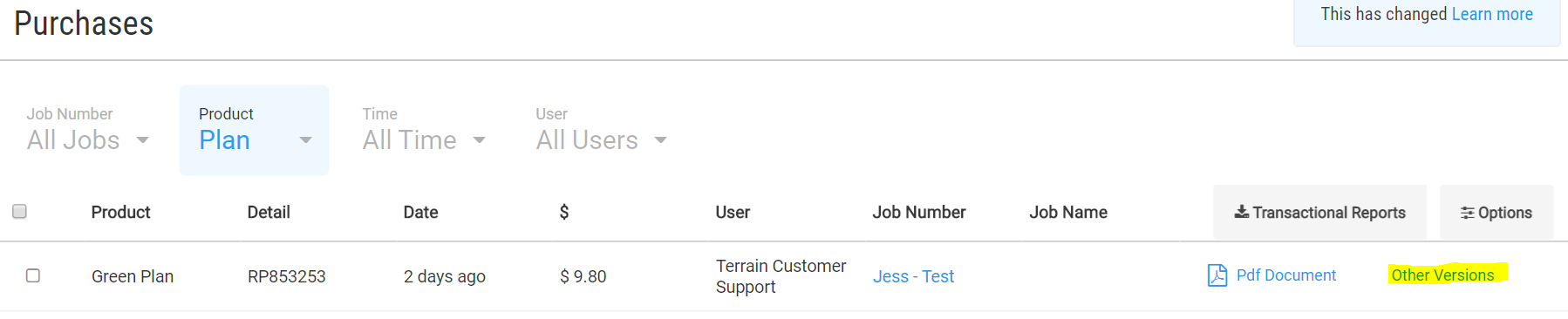
This allows you to select PDF versions we have in the archive. Do this by selecting the PDF icon.

Other possibilities:
- We have no other copies of the Green Plan, so we will remove the poor quality copy from the Plan Archive and refund the Green Plan transaction. You can then re-order the Plan and select to obtain a DNRM copy. If you proceed to order a DNRM copy please email our team the details so we know to refund the original Green Plan purchase from your account.
- If it is a DNRM sourced copy that is illegible or incorrect we then contact DNRM to obtain a better scan. As DNRM were the supplier of that Plan we have to contact the department to get the Plan re-imaged. You cannot contact the department directly. We a new scan has been received we will then send you a new copy via email.
If a file needs to be deleted, refunded or re-scanned please contact our team by sending us an email to support@dyedurhamterrain.com with the following details:
- Job number
- Plan number
- Date purchased
- Brief detail about the issue and how you wish to proceed.
*Please note that QLD Plans (DOR copies from the department) often cannot be refunded unless there is a clear technical error that has occurred.
Comments
0 comments
Please sign in to leave a comment.